It’s super easy! No problem…
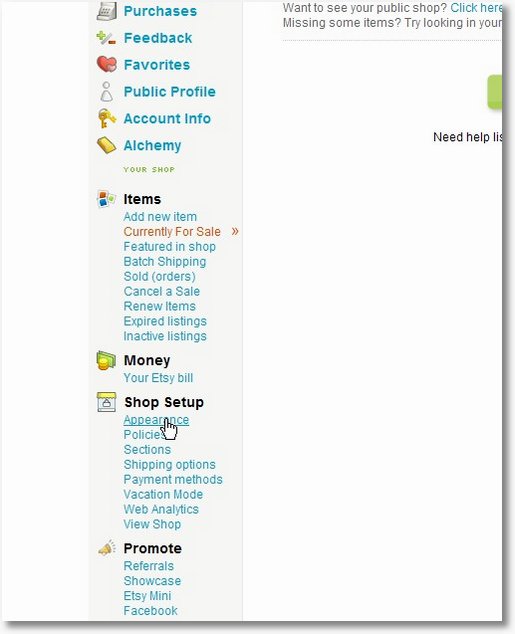
Sign in, then go to “Your Etsy”, and click on Shop Appearance in the menu to the left.
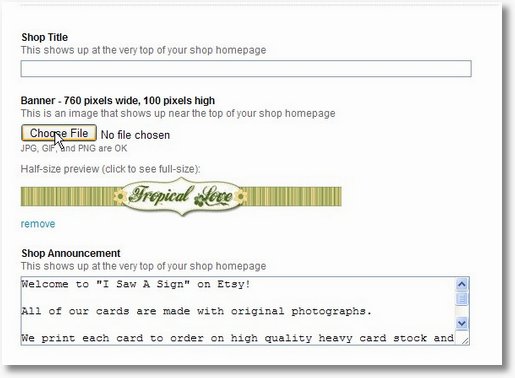
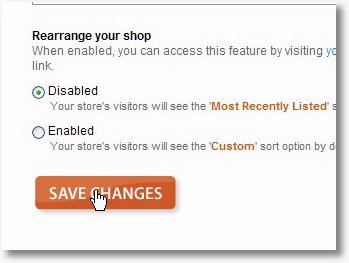
On the next screen, you’ll see your current banner and a button to choose a new one. Something happened to my first picture, so this shows the new banner, but the idea is the same… just click that button, browse to the file you just saved and that’s it. Make sure you hit “save changes” at the bottom of the page.
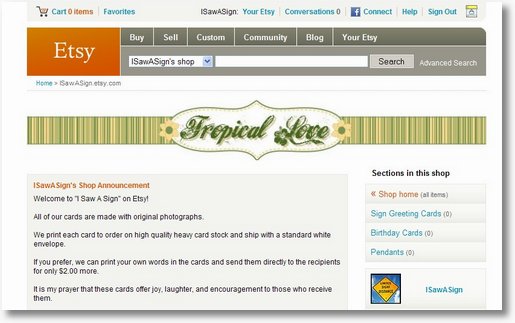
That’s really simple. Your new banner is on your Etsy Shop:
Best of luck to you for your Etsy Success!!!
I have been getting you RSS feed for quite some time now and love your blog. The banners are fabulous, and this has been so helpful!! I just redid my etsy shop…cyndesplace and it looks so great and well *me*!
Thanks, and the pixlr site is incredible!!!! Thanks again.
~cynde
Thank you for the free banners. I love your blog and I’m a fan on facebook. I’m going to suggest everyone in the Handmade Dayton Etsy Team become a facebook fan.
Thanks for all the creativity!
Best to you,
Julie
Thank you for the cute banner! I am new to Etsy and it looks great on my shop page. It was so easy to do also. Thanks a bunch!
Marla 🙂
Thanks so much for this easy to use banner hook up! Love it
Thank you for your free banners and etsy shop setup. I just added one of your buttons to my blog.
Thanks so much for the great free banners and tutorial. I know next to nothing about editing pictures so it was a tremendous help!
Thank you so much for the free banners and your tutorial. Easy Peezy!!
Thanks so much for our help. I love my new banner.
Thanx so much. My shop looks so much better.
Thank you SO much for posting this!! I struggled for hours before I found your site!!
You rock!
Thank you so much for the free banner and info. You made it very easy to set up!
Many thanks for the free banner & the step by step. I was able to do this easily. Love your website.
Wow! You made that sooo easy! Thanks, my banner looks fantastic. I was done in less than 5 minutes! One problem–I’ve uploaded it to my etsy page, clicked saved changes, but it is not showing up in my shop? Maybe it takes a little while to appear?? This isn’t your problem, I can email etsy help, but I thought I would ask just in case it was some silly quick fix. Anyway, thanks a million!!
Umm, scratch that last question. I really need to work on patience! My banner is up and looking fabulous. Thank you so, so much!!!
thank you so much. I have been struggling with this for months!
Thanks so much for your free banners, and all the great help you post here! You have given me the information I needed to get started. I opened my shop today and just got done making my banner from your clear instructions! Thank You so much! greatfully Carey, Indigo Spirit Girl http://www.etsy.com/shop/IndigoSpiritGirl
Thank you for recommending Pixlr.com, adore this.
Thanks for the great banners
does your shop have to be LIVE to see the banner? still adding items and haven’t officially opened. i can’t see my banner.
Nice Information Thank you very much.